 Tofu Labs
Little Blender add-ons for the annoying stuff.
Pink textures, plastic-looking roughness maps, a scale you can't apply because the object is a linked duplicate. Each add-on fixes one of these, and you can undo every fix with Ctrl+Z.
Blender 4.2 LTS to 5.2Pay once, free updatesDownload right after you pay
Material Lint
Finds roughness and normal maps set to the wrong color space, normal maps wired without a Normal Map node, and missing image files. Fix All sorts them out.

Instance-safe Apply
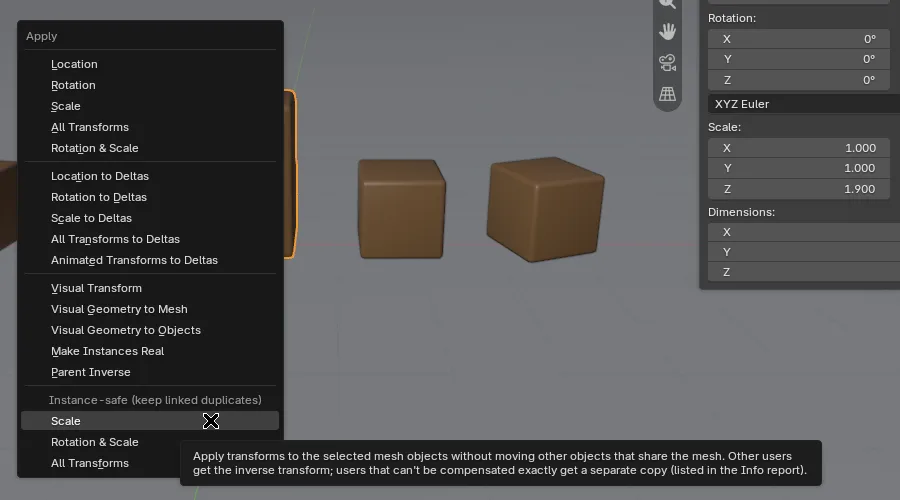
Apply scale, rotation or location to a linked duplicate (Alt+D). The other copies stay put and keep sharing one mesh.

Texture Path Manager
Lists every file your .blend points to, relinks missing textures from a folder and makes paths relative so the project survives a move.

All three for $25
Material Lint, Instance-safe Apply and Texture Path Manager together. That's $9 less than buying them one by one.
Prices in US dollars. Sales tax or VAT is added at checkout where your country charges it.
Material Lint
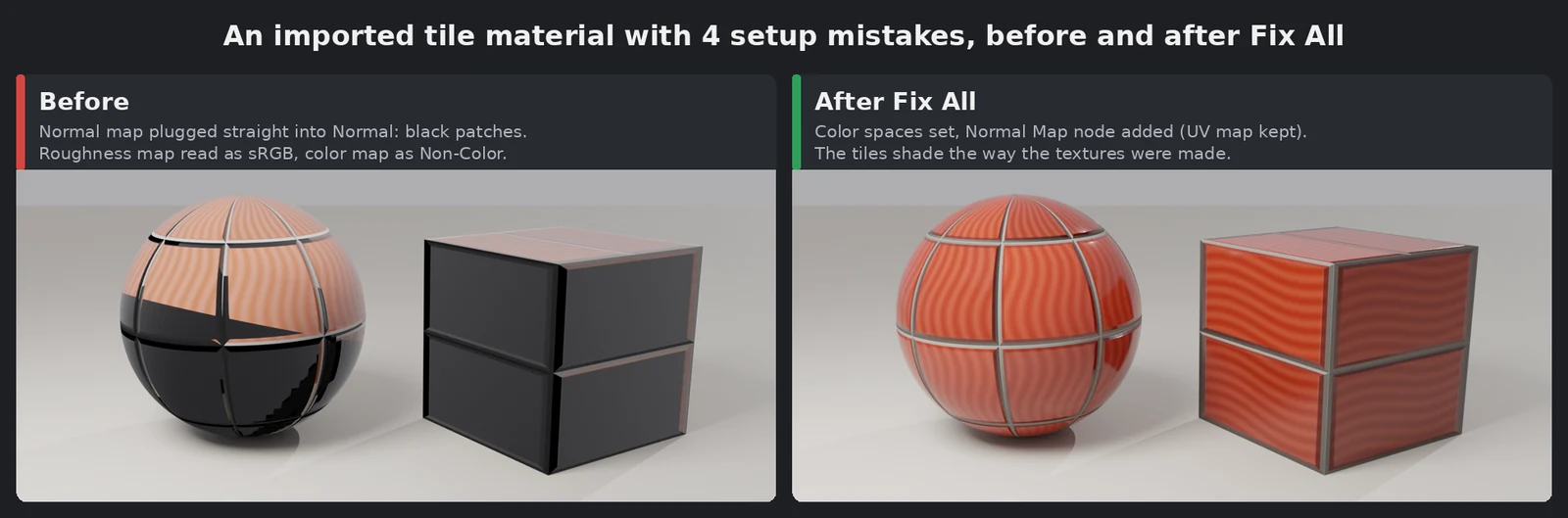
Your roughness map is set to sRGB, so the surface looks like plastic. A normal map goes straight into the Normal socket, so the lighting is off. A texture went missing when you moved the folder. Blender shows no error for any of these. Material Lint lists them, and most take one click to fix.
What it checks
- Color spaces: roughness, metallic, normal, height and packed ORM maps set to sRGB, and color maps set to Non-Color.
- Normal wiring: an image plugged straight into a Normal or Coat Normal input, through reroutes and node groups too. The fix adds a Normal Map node and keeps your UV map.
- Missing files: images that aren't on disk, including missing UDIM tiles.
- Empty image nodes: Image Texture nodes with no image in them.
- Duplicate images (off unless you turn it on): copies that load the same file. The fix points them all at one and removes the extra copies.
Good to know
- It never deletes materials or nodes and never disconnects anything.
- Linked library data is reported and left alone. Fix it in the library file.
- Every fix is one undo step.
- Write Report saves the list to a text block you can share.
- World shaders aren't scanned.
- 99 automated checks pass on Blender 4.2 LTS, 4.5 LTS and 5.2.
Instance-safe Apply
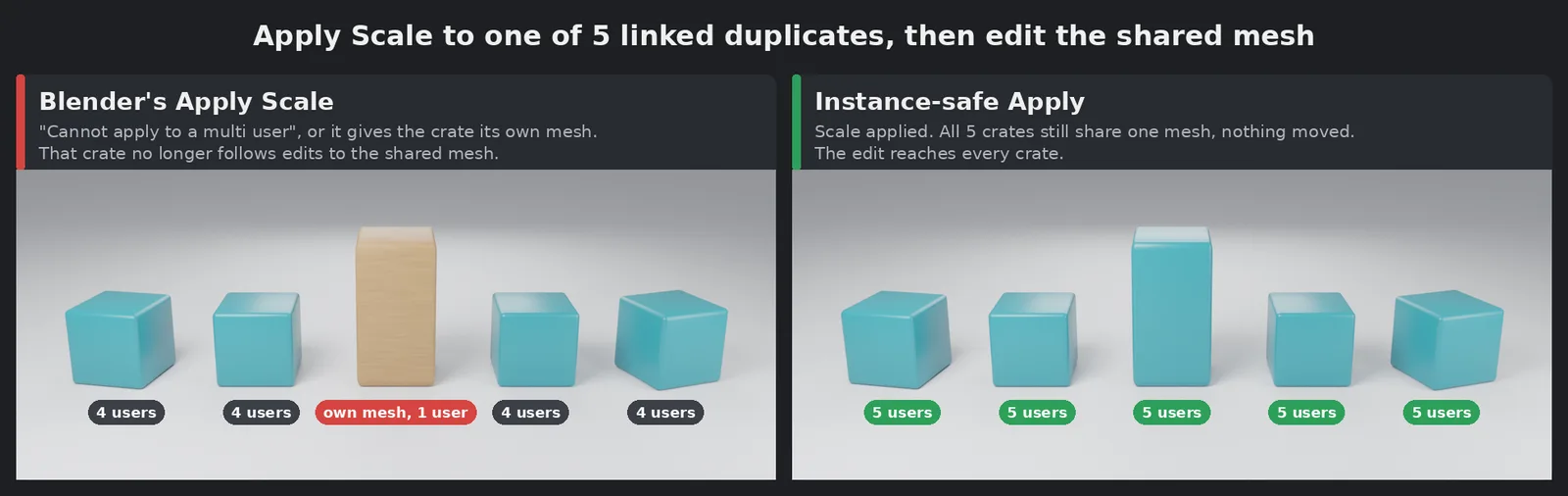
You stretched one linked duplicate and want to apply its scale. Blender says "Cannot apply to a multi user", or gives that object its own mesh, and from then on it stops following your edits. Instance-safe Apply bakes the scale into the shared mesh once and gives the other copies the opposite transform. Nothing moves in the viewport and every copy still shares the mesh.
What it does
- Adds Scale, Rotation & Scale and All Transforms to Object › Apply (Ctrl+A), under "Instance-safe".
- Copies that aren't selected, or that live in other scenes, are adjusted too.
- Copies with modifiers, constraints, animation or custom normals would look different after compensating. Those move to one untouched copy of the mesh and keep their look. You can switch that off in the redo panel.
- The Info bar lists every object it adjusted, moved or skipped. One Ctrl+Z undoes it all.
Limits
- Mesh objects only. Curves, text and empties are skipped with a message.
- A scale of zero on any axis is refused.
- Meshes with delta transforms, library-linked meshes and library overrides are skipped.
- Children parented to a vertex or bone aren't compensated (you get a warning).
- 55 automated tests pass on Blender 4.2 LTS, 4.5 LTS and 5.2.
Texture Path Manager
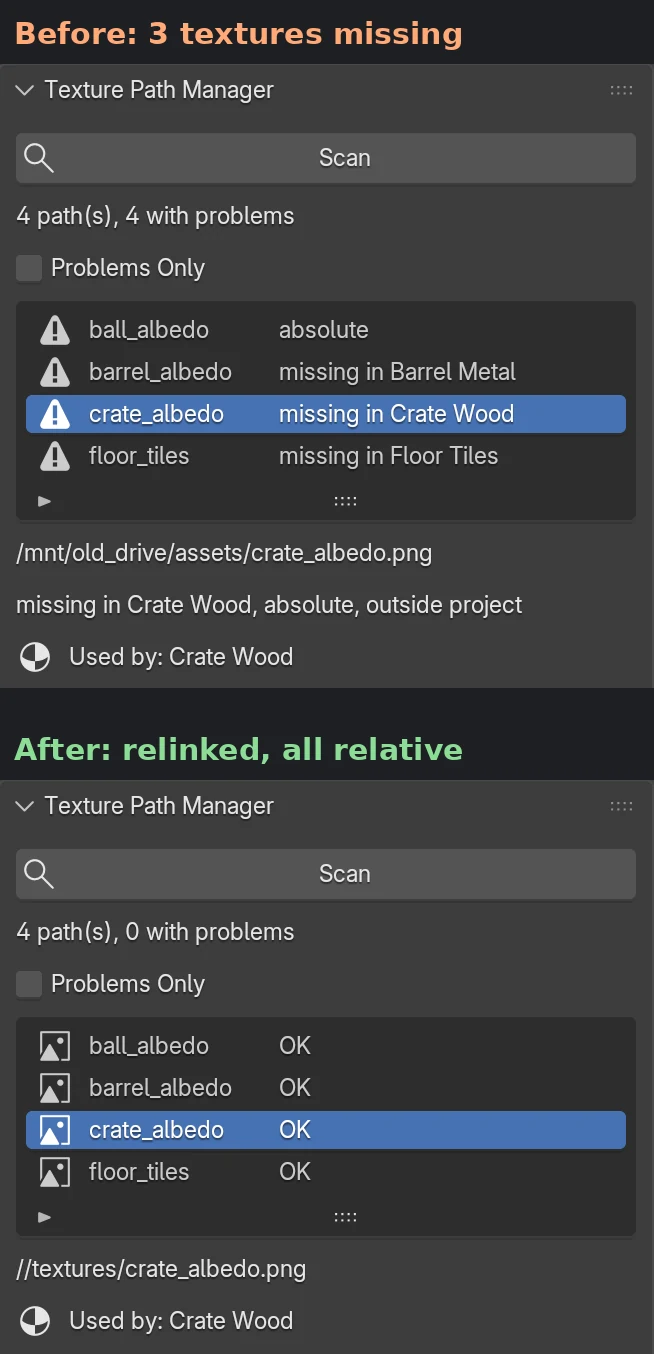
You open an older or downloaded .blend and half of it is pink. Or you need to send a project to someone and the paths point all over your disk. Texture Path Manager lists every outside file in one panel with its status and fixes the paths there.
What it does
- Scan shows each path as OK, missing, absolute, outside the project, packed, or missing UDIM tiles. A missing texture also names the material that uses it. Tick "Problems Only" to hide the rest.
- Make all paths relative or absolute in one click.
- Find & Replace in paths, with a count of what will change before you confirm.
- Relink Missing searches a folder and its sub-folders by file name. If the same name turns up in two places, it doesn't guess: it leaves that texture alone and lists both places in the Info bar.
- Collect Files copies outside files into a textures folder next to your .blend. It never moves, deletes or overwrites the originals.
Good to know
- Covers images (UDIM too), linked libraries, sounds, movie clips and Alembic/USD caches.
- Ctrl+Z undoes path changes. Blender can't undo library paths, so there's a Revert Library Paths button.
- Relink works on files that are fully missing, not UDIM sets missing a few tiles.
- 160 automated checks pass on Blender 4.2 LTS, 4.5 LTS and 5.2.
Want all three?
The pack is $25 instead of $34.
Questions
How do I get the add-on?
Right after you pay, this page takes you to your download page. Bookmark it: it always has the newest version of what you bought. Paddle, our payment provider, also emails you a receipt. There's no account to make.
How do I install it?
- Download the .zip (don't unzip it).
- In Blender, open Edit › Preferences › Get Extensions.
- Click the ⌄ menu at the top right, choose Install from Disk and pick the .zip.
Or drag the .zip into the Blender window.
Which Blender versions?
Blender 4.2 LTS to 5.2, and we test each new release. The add-ons are plain Python, so they run on Windows, macOS and Linux. Every release is tested on Blender 4.2 LTS, 4.5 LTS and 5.2.
What license is it?
GPL-3.0-or-later, like Blender. You can use it on any number of your own computers and in commercial work. Buying it pays for the testing and the updates.
What if it doesn't work for me?
Write to [email protected] with your Blender version. And if you just want your money back, you get a full refund within 14 days, no reason needed: see the refund policy.
I lost my download page.
Write to [email protected] from the email you paid with and we'll send you the link.