 RowDocs
Google Form response to PDF, automatically
Link your Form to a Sheet, make a Docs or Slides template with <<tags>> for the questions, and switch on the form trigger. Every new response becomes a PDF in your Drive and can be emailed to the person who submitted it.

RowDocs isn't in Google's add-on store yet, so you can't install it just yet. Leave your email and we'll write to you the day it's ready.
One email on launch day, then we forget your address. Privacy
| Name | Class | RowDocs |
| Rina Sari | Sat 18 Oct | PDF emailed |
| Tom Becker | Sun 19 Oct | PDF emailed |
Runs by itself on each new form response.
Booking confirmed
Hi Rina Sari,
You're booked for Wheel throwing for beginners on Saturday 18 October, 10:00. Aprons are on us.

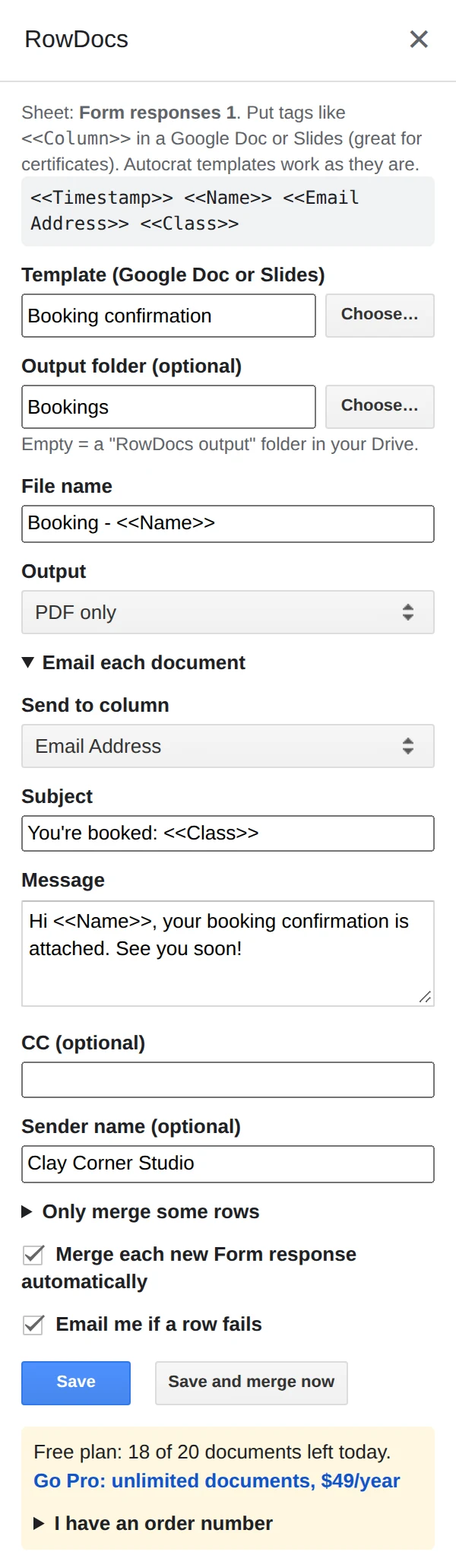
What it looks like in Google Sheets
RowDocs lives in a side panel in your sheet: Extensions › RowDocs › Set up merge.
- Link the form to a sheet. In Google Forms, Responses › Link to Sheets.
- Make a Docs or Slides template with a <<tag>> for each question you want on the PDF, named exactly like the column headers.
- Switch on the form trigger. In the RowDocs panel, pick the Email Address column as the recipient and tick Merge each new Form response automatically.
Questions
Do I need to click anything for each response?
No. With the form trigger on, RowDocs runs by itself on every submission.
Can the PDF go to the person who filled in the form?
Yes. Pick the form's email column (e.g. Email Address) as the recipient.
Does it work with Slides templates?
Yes. Docs and Slides templates both work, and both can be saved as PDF.
Free to start
20 documents a month free, forever. Pro removes the limit for $79 a year, with a 7-day free trial. See pricing.