 RowDocs
One Google Doc per row of your sheet
Letters, contracts, reports, offer letters: write the document once in Google Docs with <<Column Name>> tags, and RowDocs makes an editable Google Doc for every row. Choose Google file only, PDF only, or both.

RowDocs isn't in Google's add-on store yet, so you can't install it just yet. Leave your email and we'll write to you the day it's ready.
One email on launch day, then we forget your address. Privacy
| Name | Role | Start | RowDocs |
| Daniel Reyes | Barista | 3 Nov | Doc created |
| Sari Wijaya | Shift lead | 10 Nov | Doc created |
| Tom Becker | Barista | 17 Nov | Doc created |
Each Doc link is written back into its row.
Offer letter
Dear Daniel Reyes,
We're happy to offer you the role of Barista, starting on 3 November 2026. Please sign and return this letter by 27 October.
Welcome to the team!

What it looks like in Google Sheets
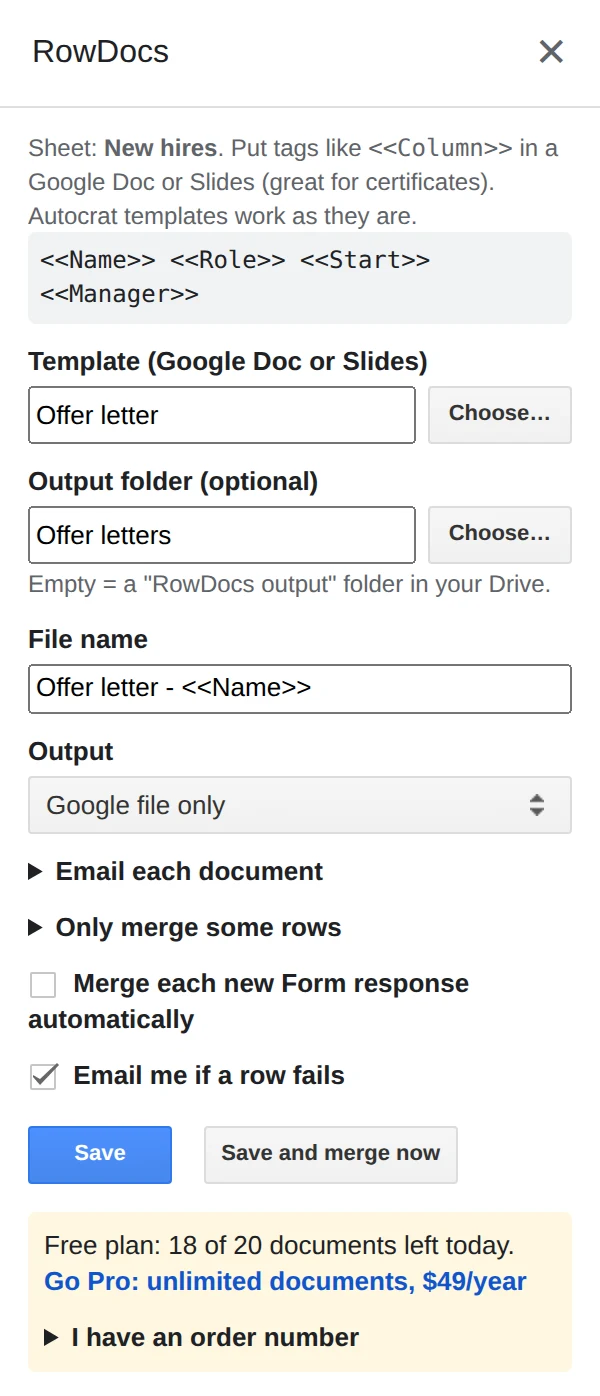
RowDocs lives in a side panel in your sheet: Extensions › RowDocs › Set up merge.
- Write the document once in Google Docs with <<Column Name>> tags.
- Choose Google file only (or Google file + PDF) as the output, and a Drive folder.
- Merge. Every row gets its own editable Doc, and the link is written back into the row.
Questions
Do I get editable Docs or only PDFs?
Your choice: Google file only, PDF only, or both.
Where do the files go?
Into the Drive folder you pick, or a "RowDocs output" folder. Each file's link is written back into its row.
Does RowDocs see my other Drive files?
No. It only gets access to the template and folder you pick and the files it creates.
Free to start
20 documents a month free, forever. Pro removes the limit for $79 a year, with a 7-day free trial. See pricing.