 RowDocs
Certificates from Google Forms, sent automatically
Someone submits your Google Form (a quiz, a course feedback form, a webinar sign-in) and gets their own PDF certificate by email. RowDocs fills your Google Slides or Docs certificate with their answers, saves the PDF to your Drive and sends it. Start from our free certificate template below.

RowDocs isn't in Google's add-on store yet, so you can't install it just yet. Leave your email and we'll write to you the day it's ready.
One email on launch day, then we forget your address. Privacy
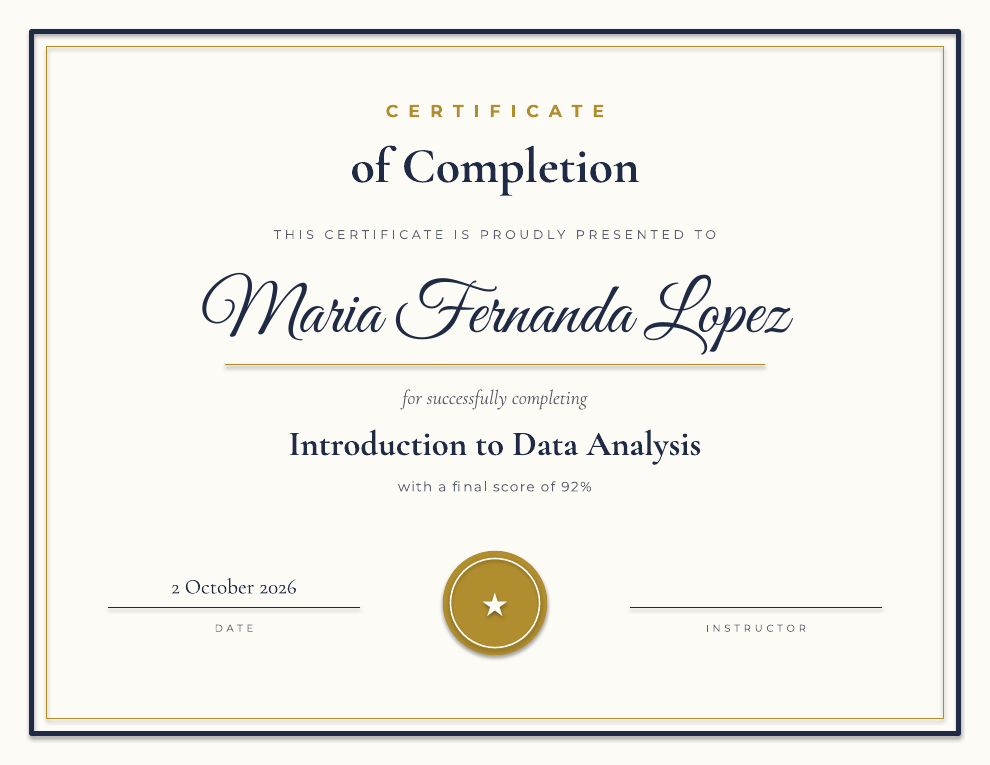
Make a copy in Google Slides Download the .pptx
Landscape US Letter. "Make a copy" puts your own editable copy in your Google Drive in one click (sign in to Google first). Prefer PowerPoint? Download the .pptx; you can also upload it to Google Drive and open it with Google Slides. It uses three free Google Fonts (Great Vibes, Cormorant Garamond and Montserrat): Google Slides has them built in, and for PowerPoint you can install them from Google Fonts first. Free to use, with or without RowDocs.
Who it's for
Teachers
Students take a Google Forms quiz; the ones who pass get a certificate with their name and score.
Trainers and course creators
Completion certificates for workshops, onboarding and CPD sessions, without editing each one by hand.
Webinar and event hosts
Attendees fill in the attendance or feedback form after the session and their certificate arrives in their inbox.
How it works, in 3 steps
- Make your certificate. Open the template in Google Slides and change the wording and colors, or add your logo. The <<Name>>, <<Course>>, <<Score>> and <<Date>> tags are filled from the response, so rename each one to match a column header in your form's response sheet (for example <<Full name>>). Delete the score line if you don't need it.
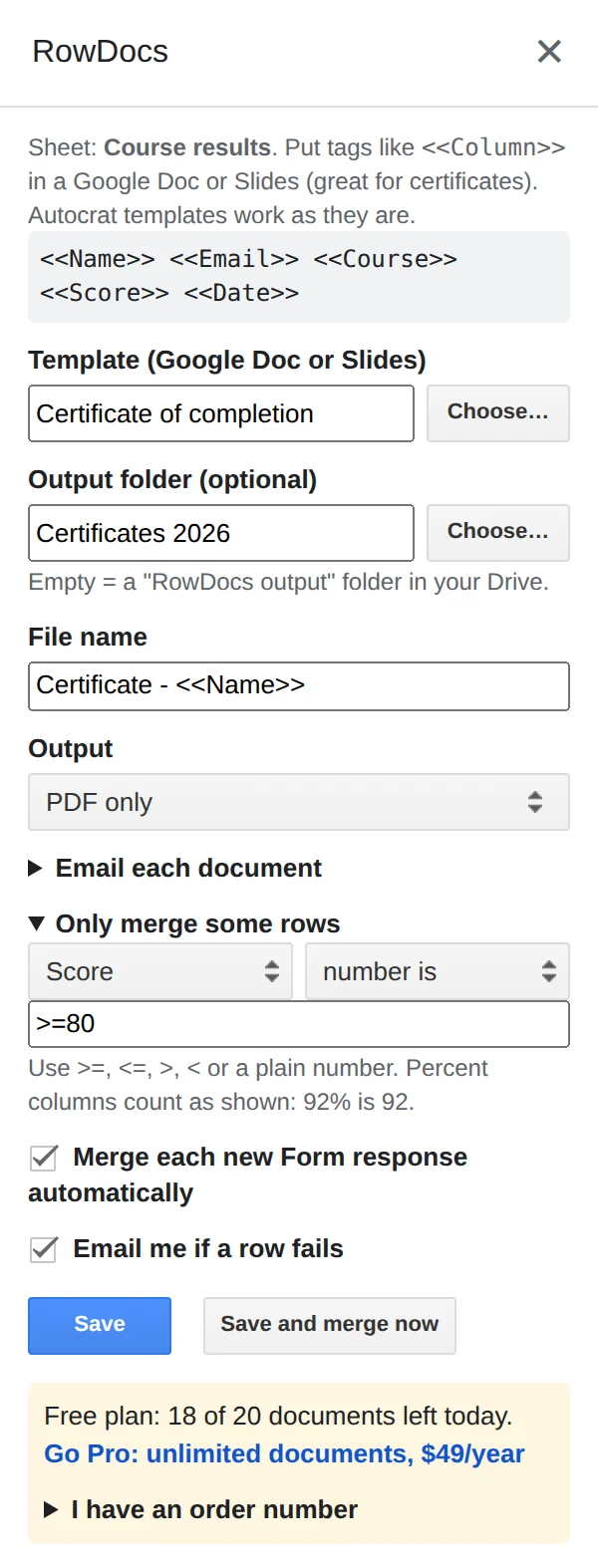
- Connect your form's response sheet. In the sheet, open Extensions › RowDocs › Set up merge, choose the template and a Drive folder, set the output to PDF, and pick the Email Address column to send each certificate to. You can write the email subject and message with the same tags.
- Tick "Merge each new Form response automatically". Every new response now gets its certificate shortly after it comes in. For responses you already have, click Save and merge now once. The PDF link and status are written back into each row.
Only want certificates for people who passed? Under "Only merge some rows", choose the Score column, "number is" and >=80: only rows with a score of 80% or more get a certificate, and the rest are skipped. Percent scores count as they show in the sheet, so 92% is 92.
Questions
Can only people who passed get a certificate?
Yes. Add a row condition, for example Score number is >=80 (only rows with a score of 80% or more), or Result equals "Pass", and other rows are skipped.
Can the date look like 2 October 2026?
Yes. The template uses <<Date|date:d MMMM yyyy>>, which formats a date column (such as the form's Timestamp) any way you like.
Does it send from my own email?
Yes. Certificates are sent from your own Google account, with the PDF attached. RowDocs never reads your Gmail. Google limits scripts to about 100 recipients a day on a free Gmail account and 1,500 on Google Workspace.
Will people get a second certificate if I click Save and merge now again?
No. Rows that already have a merge status are skipped.
What it looks like in Google Sheets
RowDocs lives in a side panel in your sheet: Extensions › RowDocs › Set up merge.
Each row then gets its status and links in new columns next to your data:
| Name | Merge Status | Merged PDF |
| Maria Fernanda Lopez | Merged 2026-10-02 09:14 | drive.google.com/…/1K_y4k |
| James Okafor | Merged 2026-10-02 09:14 | drive.google.com/…/1K1Kcp |
Free to start
20 documents a month free, forever. Pro removes the limit for $79 a year, with a 7-day free trial. See pricing.