 RowDocs
Mail merge with a personal PDF attached
RowDocs builds a PDF for each row from your template and emails it as an attachment, with a subject and message that can use the same <<tags>>. Links and sent status are written back to the sheet.

RowDocs isn't in Google's add-on store yet, so you can't install it just yet. Leave your email and we'll write to you the day it's ready.
One email on launch day, then we forget your address. Privacy
| Name | RowDocs | |
| Maria Lopez | [email protected] | Sent |
| James Okafor | [email protected] | Sent |
| Aiko Tanaka | [email protected] | Sent |
Subject: Your certificate, <<Name>>
Subject: Your certificate, Maria Lopez
Hi Maria Lopez,
Thanks for coming to the workshop. Your certificate is attached.
PDF Certificate - Maria Lopez.pdf
What it looks like in Google Sheets
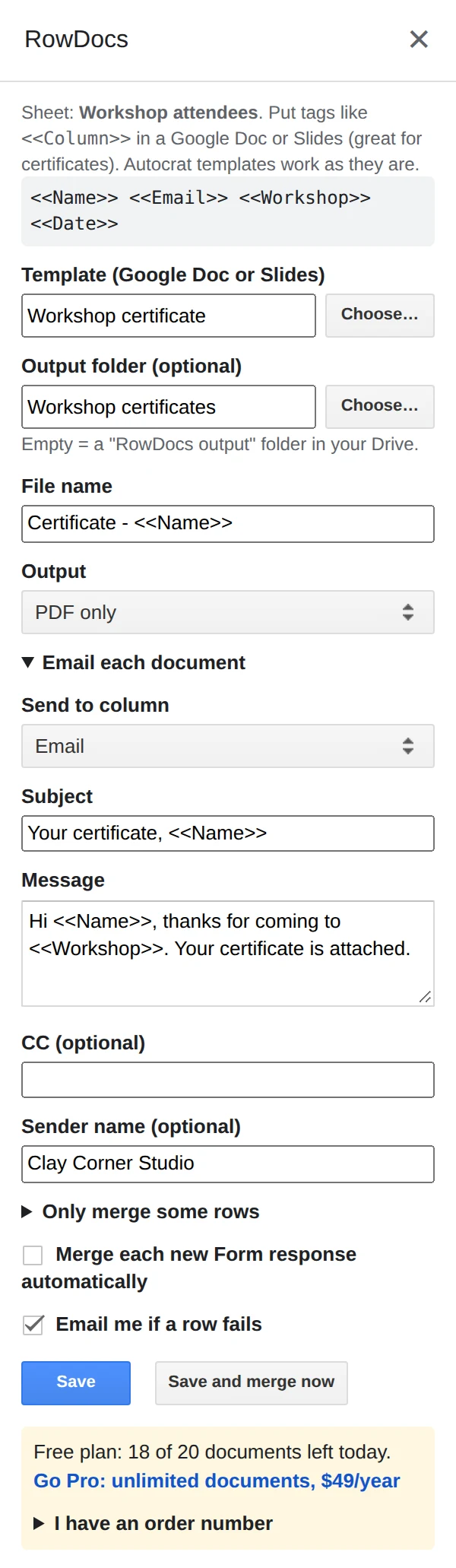
RowDocs lives in a side panel in your sheet: Extensions › RowDocs › Set up merge.
- Write the attachment once as a Google Doc or Slides template with <<tags>>.
- Write the email in the panel's Email each document section: subject and message can use the same tags, and you can add a CC and a sender name.
- Send. Click Save and merge now. Each row gets its own PDF attached, sent from your account, and the sheet shows what went out.
Questions
Which account sends the emails?
Your own Google account sends them. RowDocs never reads your Gmail.
How many emails can I send a day?
Google limits scripts to about 100 recipients a day on a free Gmail account and 1,500 on Google Workspace.
Can the subject line be personal?
Yes. Subject and body can use <<tags>> from the row.
Free to start
20 documents a month free, forever. Pro removes the limit for $79 a year, with a 7-day free trial. See pricing.