 RowDocs
Invoices from a Google Sheet, one PDF per row
Keep your invoices as rows in a sheet: number, client, amount, due date. Make a Google Docs invoice with <<tags>> for those columns, and RowDocs creates one PDF per row, named the way you want, and can email each client their own invoice.

RowDocs isn't in Google's add-on store yet, so you can't install it just yet. Leave your email and we'll write to you the day it's ready.
One email on launch day, then we forget your address. Privacy
| Invoice | Client | Status | RowDocs |
| INV-1041 | Kebun Kopi Café | Ready | PDF emailed |
| INV-1042 | Studio Lima | Ready | PDF emailed |
| INV-1043 | Mira Florist | Draft | Waiting |
Rule: only rows whose Status is Ready. INV-1043 waits.
INVOICE
Billed to
Kebun Kopi Café
| Menu and logo design | 1,250.00 |
| Total (USD) | 1,250.00 |

What it looks like in Google Sheets
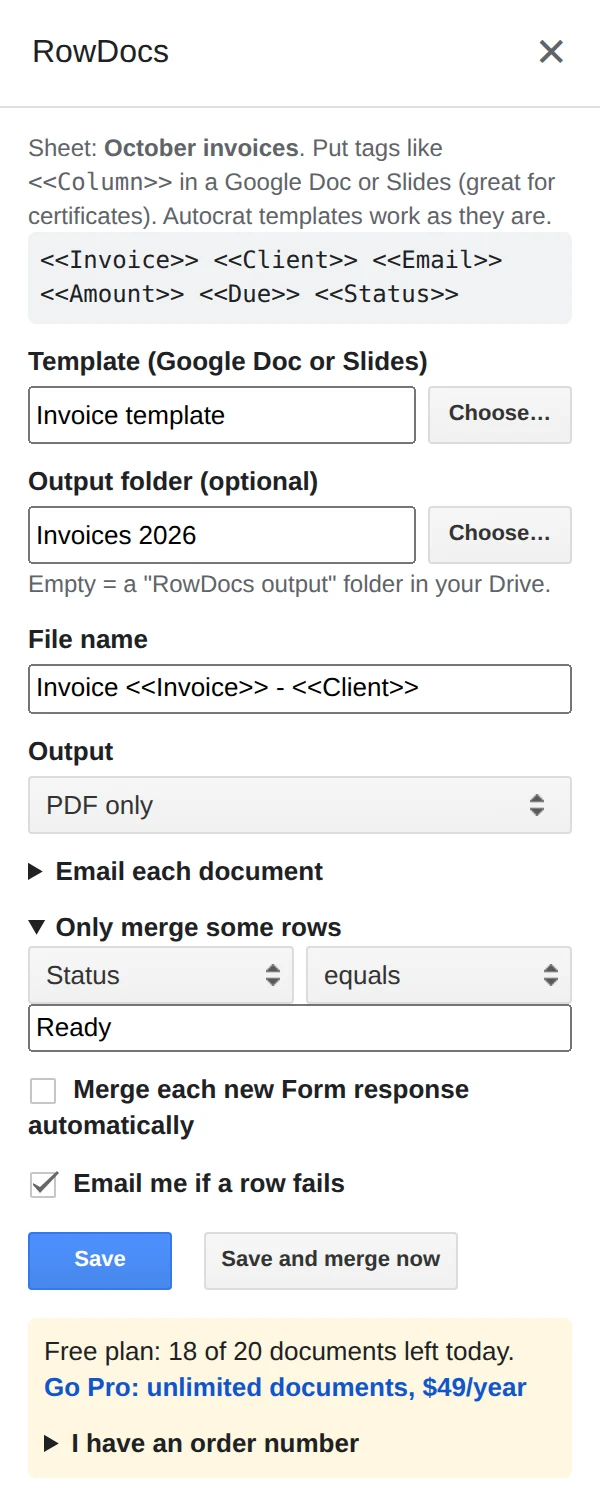
RowDocs lives in a side panel in your sheet: Extensions › RowDocs › Set up merge.
- Make your invoice in Google Docs with tags like <<Invoice>>, <<Client>> and <<Amount|number:2>>.
- Name files by invoice number (Invoice <<Invoice>> - <<Client>>) and add the condition Status equals "Ready".
- Merge when you're ready. Ready rows become PDFs and can be emailed to each client; the rest wait.
Questions
Can amounts show two decimals and thousands separators?
Yes. <<Amount|number:2>> prints 1,234.50, and <<Due|date:d MMMM yyyy>> formats dates.
Can I only send invoices that are ready?
Yes. Add a row condition, e.g. Status is "Ready", and other rows wait. Rows that were already merged are skipped.
Can one invoice list several line items?
Each row makes one document, so put the lines you need as columns (Item 1, Item 2, ...) or a single text column.
Free to start
20 documents a month free, forever. Pro removes the limit for $79 a year, with a 7-day free trial. See pricing.