 RowDocs
One PDF per row of your Google Sheet
Write a Google Doc with <<tags>> for your column names. RowDocs fills a copy for every row, saves it as a PDF in the Drive folder you choose, and writes the PDF link back into the sheet.

RowDocs isn't in Google's add-on store yet, so you can't install it just yet. Leave your email and we'll write to you the day it's ready.
One email on launch day, then we forget your address. Privacy
| Student | Reading | Maths | RowDocs |
| Nadia Putri | A | B+ | PDF saved |
| Leo Hartono | B | A | PDF saved |
| Sam Walker | A- | A- | PDF saved |
File name: Report card - <<Student>>.pdf
Report card
Nadia Putri
| Reading | A |
| Maths | B+ |

What it looks like in Google Sheets
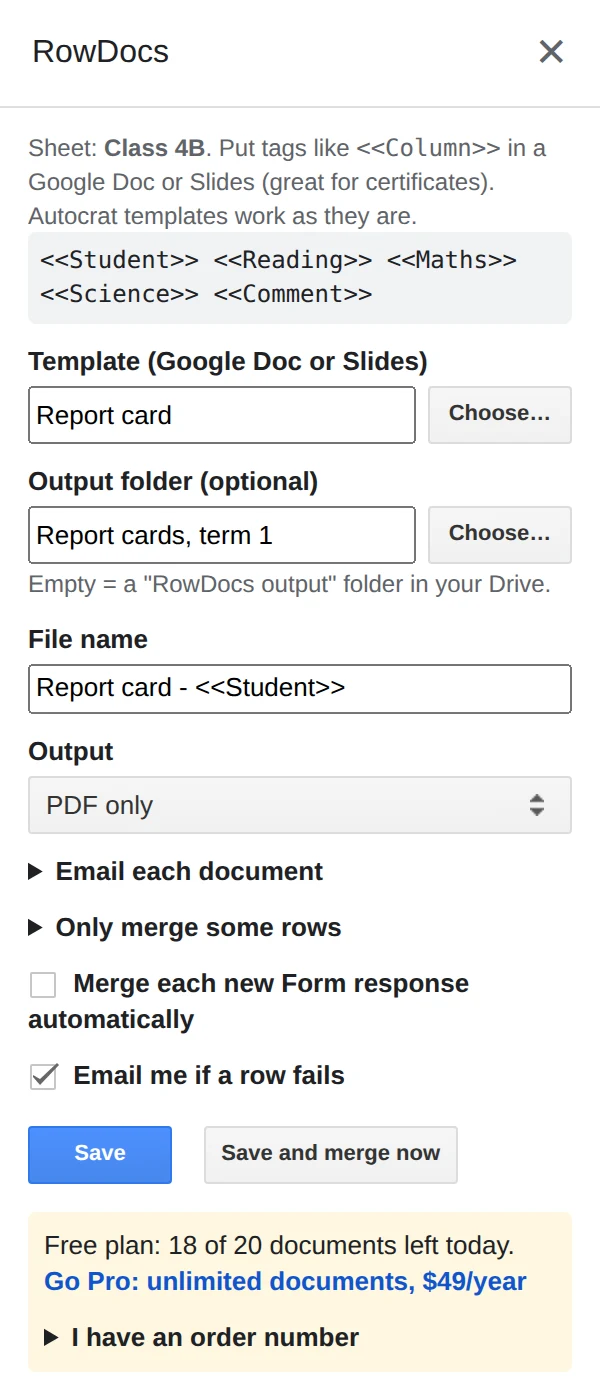
RowDocs lives in a side panel in your sheet: Extensions › RowDocs › Set up merge.
- Make the template. Write a Google Doc with <<tags>> for your column names, like <<Student>> and <<Reading>>.
- Set the file name and folder. In Extensions › RowDocs › Set up merge, name each file from the row (Report card - <<Student>>), pick a Drive folder and choose PDF only.
- Click Save and merge now. Each row gets its PDF, and the link lands in a Merged PDF column next to it.
Questions
Can I name each PDF from the row?
Yes. The file name is a template too, e.g. Invoice <<Number>> - <<Client>>.
Can it skip rows that are already done?
Yes. Rows that already have a merge status are skipped, and you can add a condition like Status is "Approved".
Can I format numbers and dates?
Yes: <<Amount|number:2>>, <<Date|date:d MMMM yyyy>>, <<Name|upper>>.
Free to start
20 documents a month free, forever. Pro removes the limit for $79 a year, with a 7-day free trial. See pricing.